Turning LlamaExtract into a product
LlamaExtract is a powerful primitive. I designed the end-user workflow customers kept rebuilding around it — invoice review with contract cross-check, escalation, and supplier loop.
I joined LlamaIndex as the first design hire in 2024. Many customers were integrating LlamaExtract and building the same end-user product around it. The team scoped a deployable reference and I led the design — so customer engineers ship faster and their reviewers get something usable on day one.
Opportunity
LlamaExtract returns structured fields from invoices, contracts, and scanned PDFs. Customers had it in production. What it didn't ship with was an end-user product — a workflow that cross-checks values against contracts, routes ambiguity to a human, escalates violations, keeps an audit log, and closes the loop with the supplier. Each customer's engineering team was building that themselves.
The workflow's shape was nearly identical across customers, but implementations diverged, reviewers saw materially different experiences, and configuration drift made support harder. Per-field confidence scores didn't yet exist on the platform — without them, no UI could honestly decide what to auto-approve. Engineering hours were burning on re-implementations of the same thing, and customers were asking for a reference they could fork.
Goal
I designed the reference for the invoice-processing use case: a four-agent workflow that parses, validates against contracts and POs, routes ambiguity to a human, and produces audit-ready records. Four design questions framed the work:
-
01
Land on a real workflow — one recurring across customers, without each of them rebuilding it.
-
02
Shape the platform — it didn't yet emit the per-field confidence the surface needed to route ambiguity.
-
03
Name the reviewer's job — not edit data, but ratify the agent's decisions.
-
04
Opinionated yet forkable — deployable in audit on day one, adaptable for other verticals.
I anchored on one concrete pattern — invoice review with cross-check — and tested every choice against parts catalogs, healthcare claims, and logistics. Per-field confidence scores started inside this project and were later added to the LlamaExtract API.
A burst of 2,000 invoices doesn't drop 2,000 documents on the queue — the pipeline routes by confidence and cross-check first:
INGEST → EXTRACT → CROSS-CHECK → ROUTE
              vs MSA·PO·     ├─ ≥80%        → auto-approve
              supplier       ├─ 50–79%      → human reviews
              registry       ├─ <50%        → auto-flag Quality
                             └─ check fails → auto-flag Compliance
Process & foundations

Stack. Built on shadcn, plus four semantic colour families — amber needs review, green approved, blue on hold, red problems — used consistently wherever a state shows up: chip dot, document tint, table badge, breadcrumb pill.
Accessibility — WCAG 2.1 AA. Audited with pa11y and axe across the three core routes. AA is the legal bar (ADA, EU Accessibility Act) and the B2B norm; AAA's 7:1 contrast would have ruled out half the muted palette without real benefit in a desktop audit tool.
The product
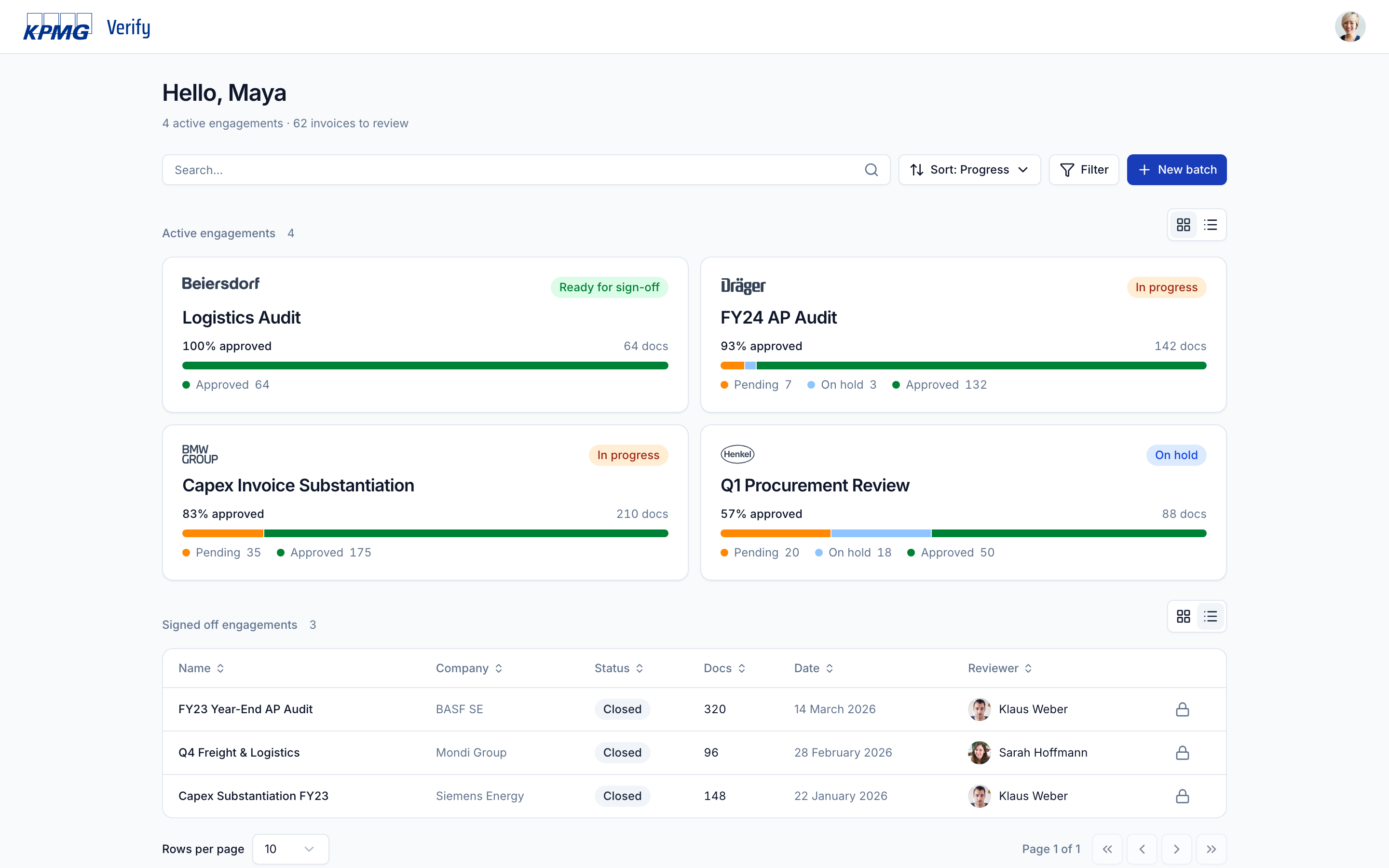
Engagements home
Greeting plus operational summary. Active engagements as cards — monochrome client logos so brand doesn't compete with status colours.
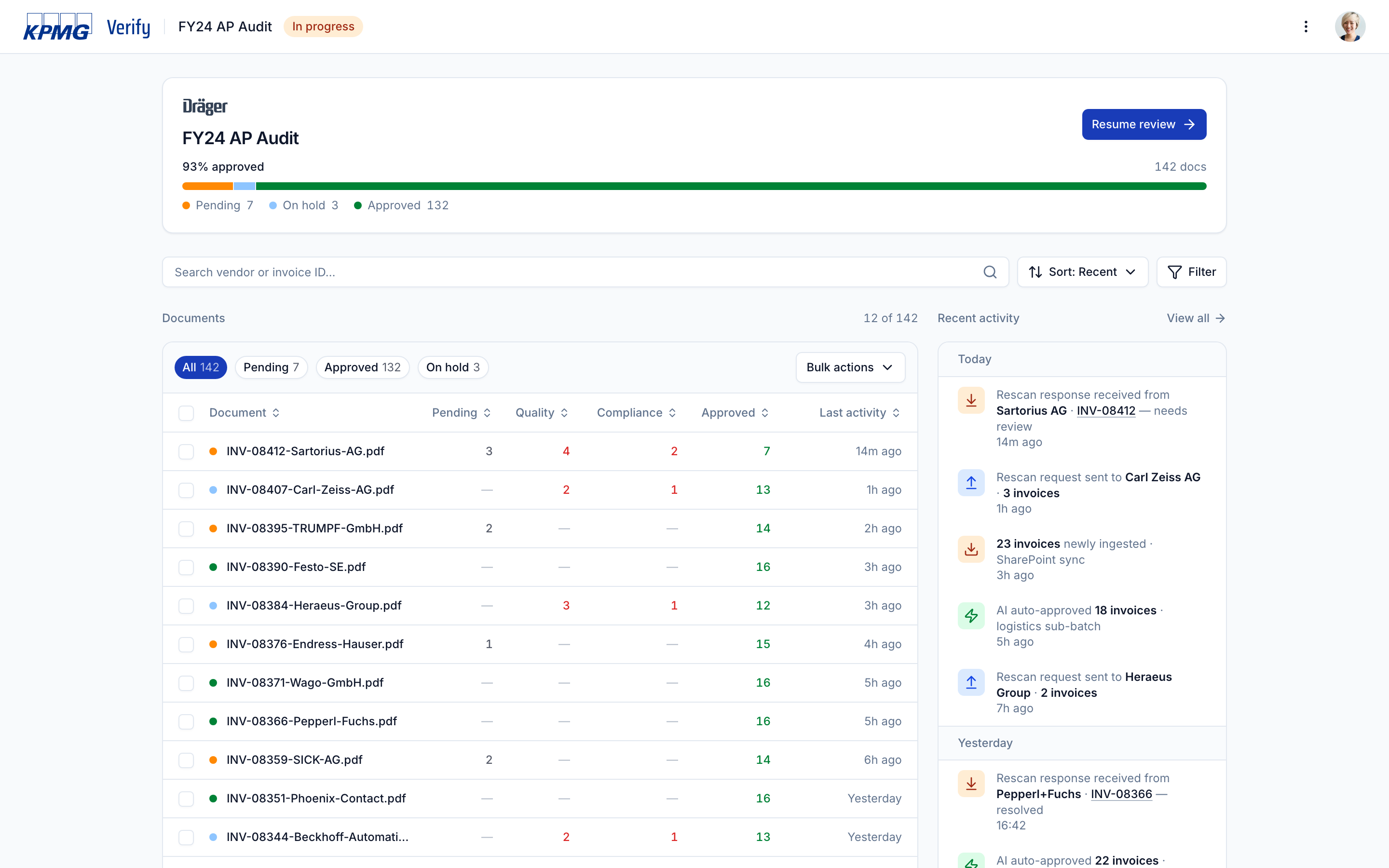
Batch detail
The four-status taxonomy rolls up to the documents table. The activity feed shows only events that move work forward; field-level approvals live in the field audit log.
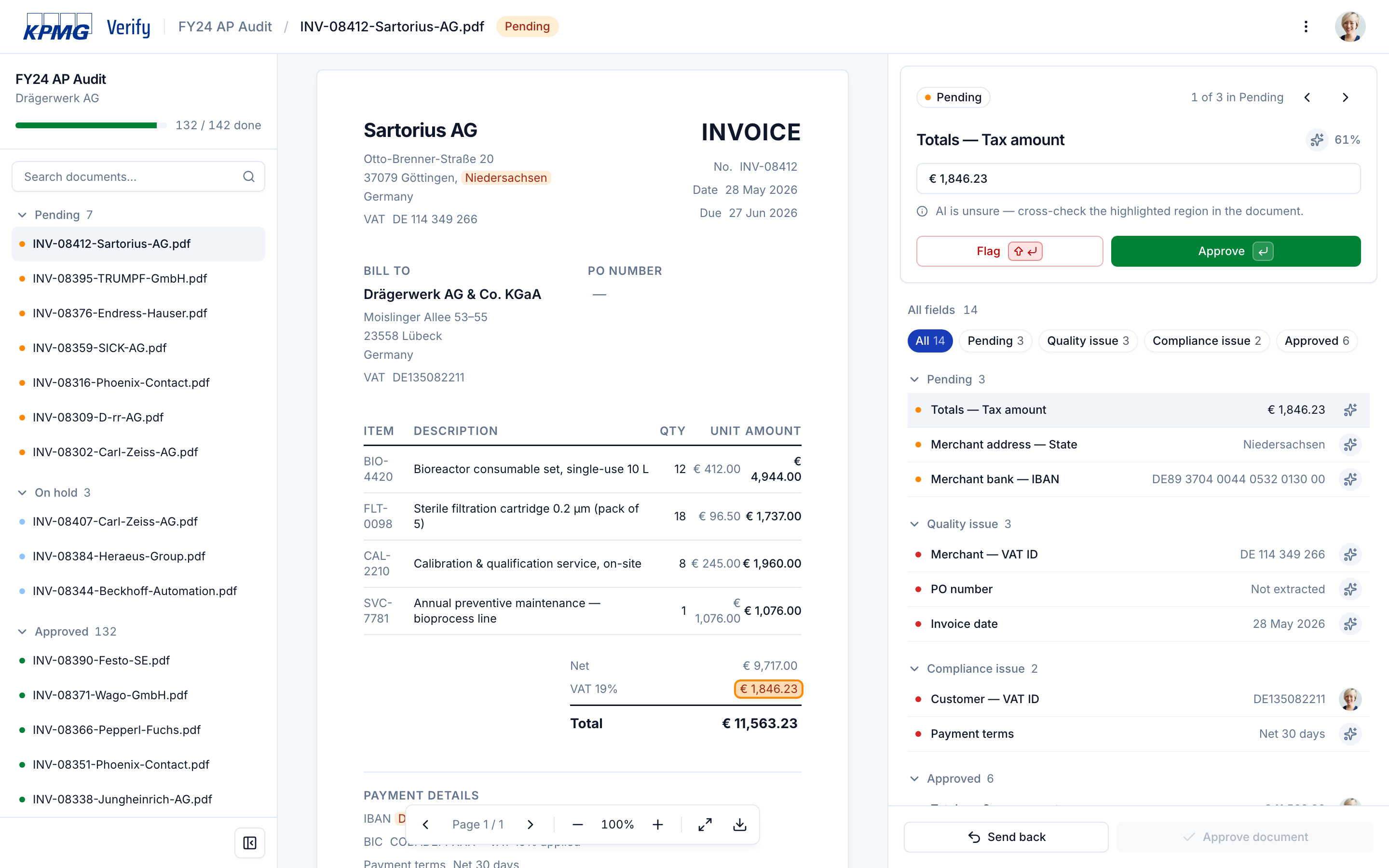
Review
Queue grouped by lifecycle · the source document · the pinned focus card with filter strip and field list. Only pending fields are tinted amber, so the document reads as a checklist — every coloured value is one decision to close.
Design decisions
One signal, one job
Each row carries exactly two signals. A coloured dot says what state the field is in — the same colour that tints the value in the document. An actor icon says who decided — an AI sparkle or the reviewer's photo. Hovering the sparkle reveals the confidence percentage; the number is there if you ask, hidden by default.
Keyboard-first, in decision-relevance order
Enter approves, Shift+Enter flags, Delete reverts — no decision is ever trapped. Tab moves through fields in decision-relevance order — pending, flagged, approved — the way the reviewer thinks, not the way the AI parsed.
Quality vs Compliance — two flags, two escalation paths
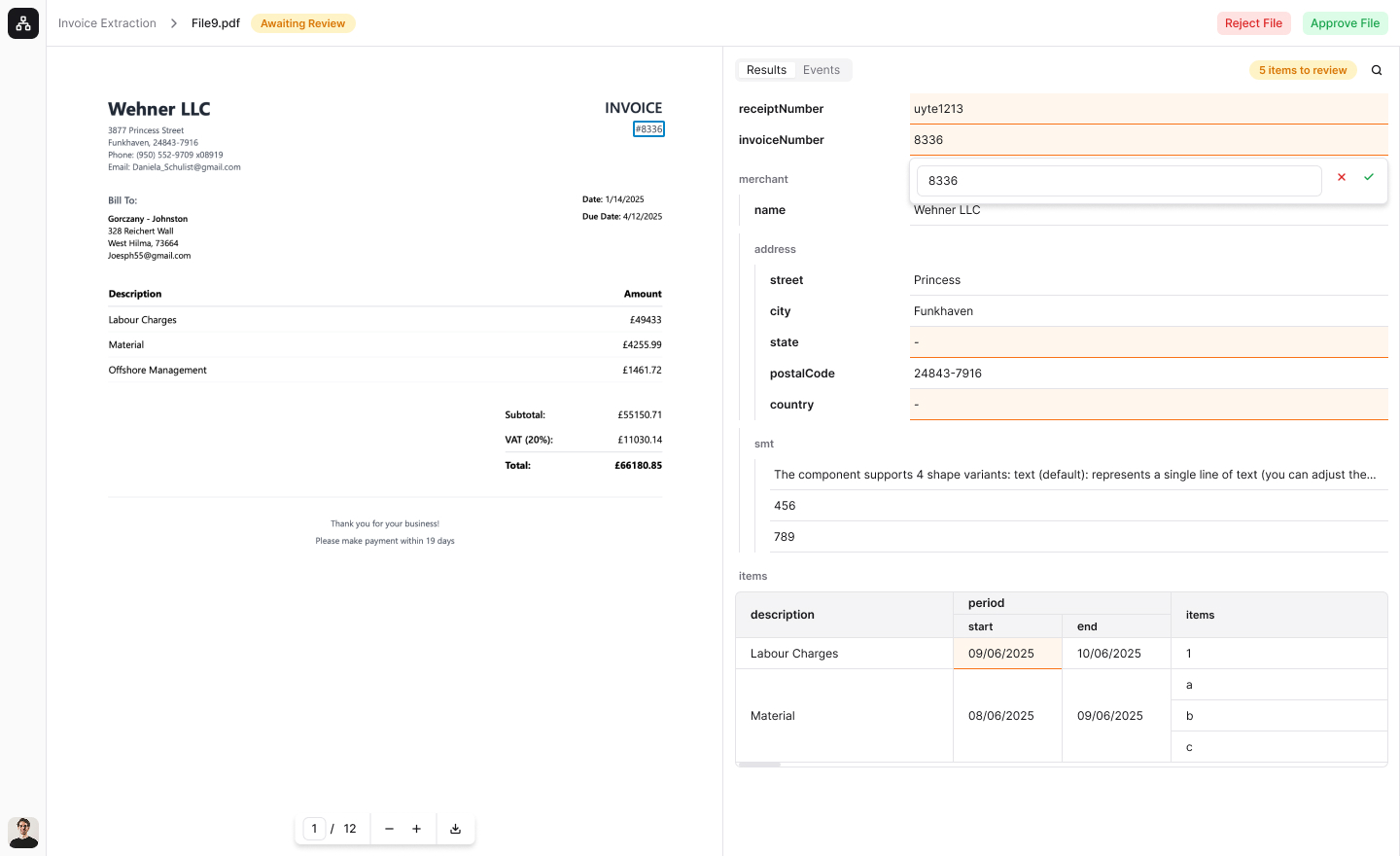
The central opinion of the product. Early on, flagging was a single confirmation: the field goes red, the document goes to Awaiting Rescan, the supplier gets an email.

It broke on cases a rescan can't fix — a readable VAT ID that doesn't match the master record isn't a scan problem; it needs escalation. So I rebuilt the form to ask why: Quality keeps the one-click rescan flow; Compliance requires a typed reason, becomes a permanent audit-log entry, and routes to escalation.
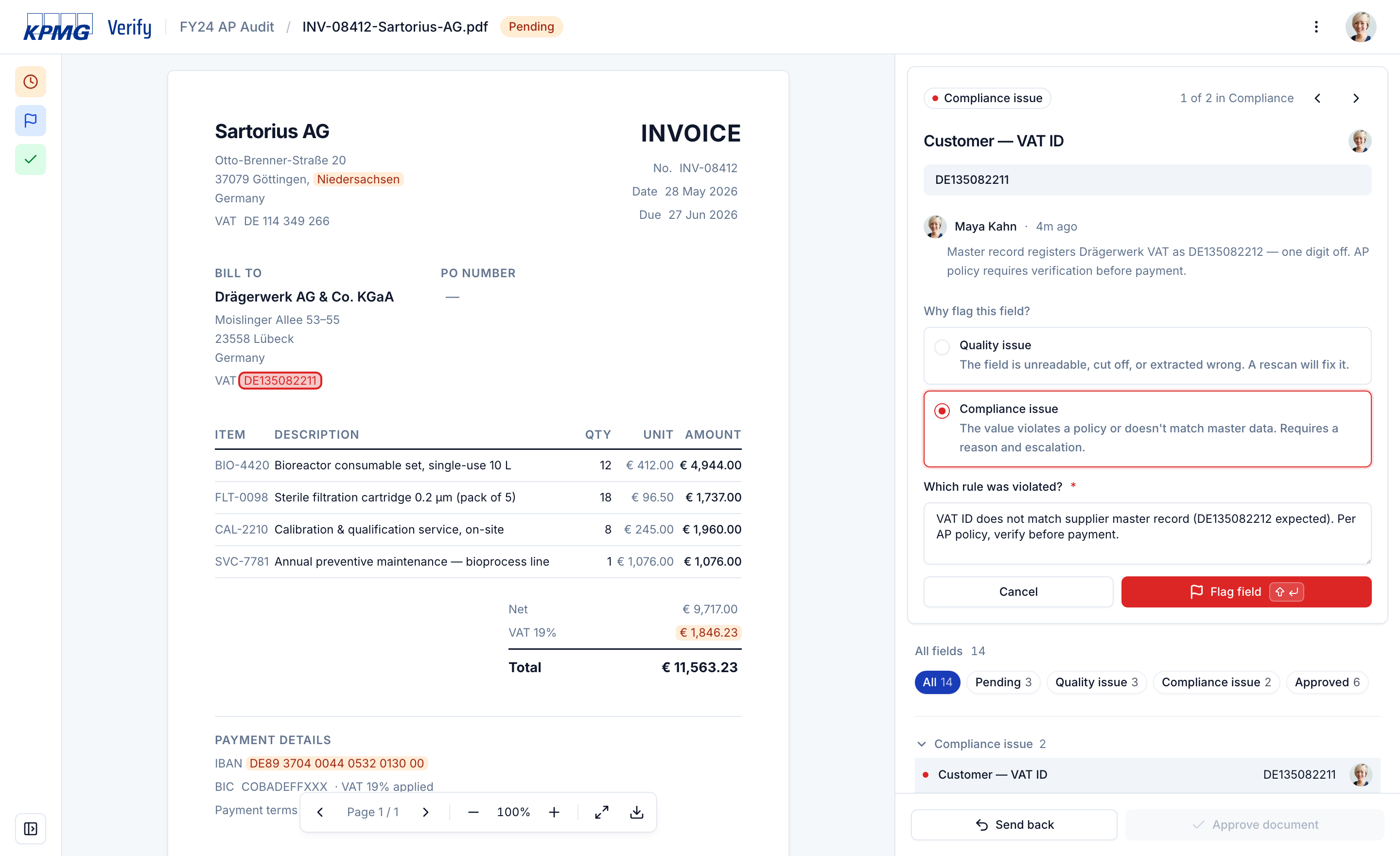
 Before
After
Before
After
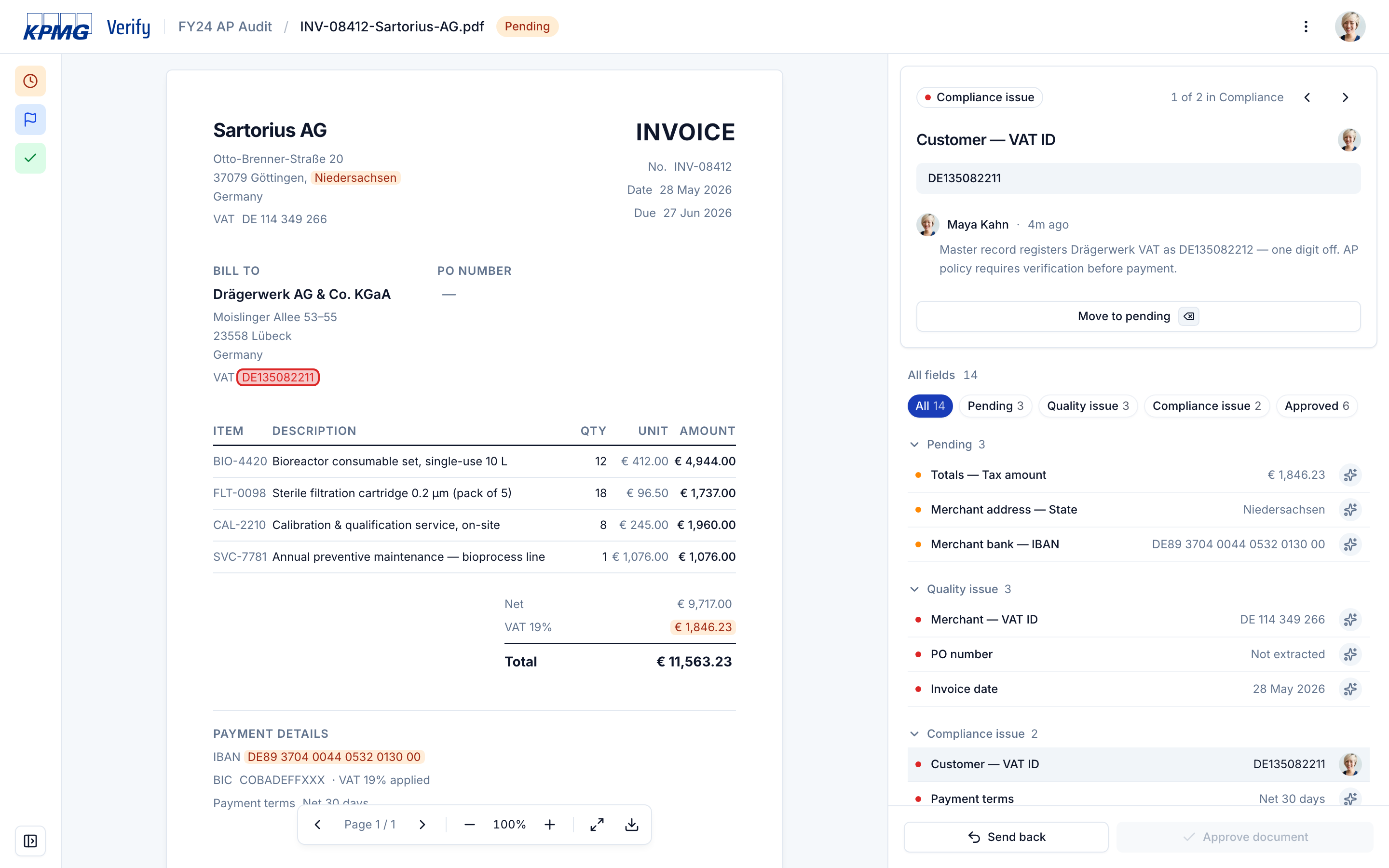
This split echoes through the whole system — the four-status taxonomy, the send-back dialog's two-block layout, the audit-log distinction between rescan and escalation events.
Autosave + audit log replaces the Save button
Edits debounce 900 ms, then stamp an audit entry — Maya Kahn · Edited · Just now. The field stays pending: ratification is still a separate, explicit action.
The focus card is the unit of work
Everything needed to ratify one field — value, actor, hint, audit trail, AI confidence — lives on one card pinned to the right of the document, reshaping around each field's state. The hint changes with state: "AI is unsure — cross-check the highlighted region" for pending, the flagging reason pinned as a note for Compliance, the full edit/approve trail for manually approved fields.
Send-back auto-categorizes by flag type
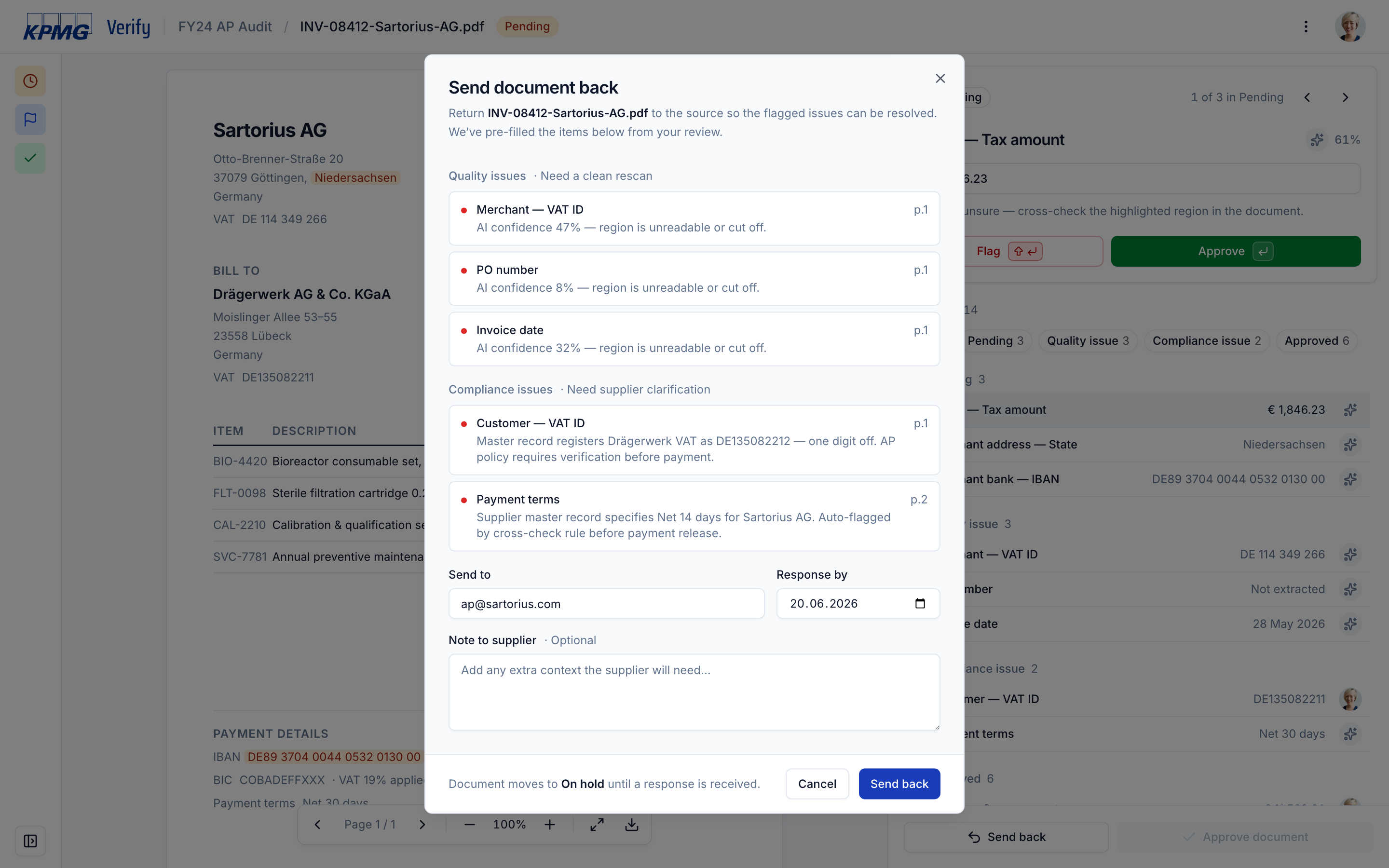
"Rescan these pages" is a different ask from "clarify this VAT ID" — separating them turns a two-minute supplier email into a thirty-second one. The dialog captures where the document goes, when a response is due, and is explicit about the consequence: the document moves to On hold until a response arrives. The reviewer never sets that status by hand.
Trade-offs I owned
In audit, the per-action record is the deliverable — so the surface shows it at every level, at the cost of a denser UI than any consumer flow would tolerate.
Something abstract enough to fit every vertical would have been usable in none. Other verticals fork the reference and re-skin.
Only pending fields are tinted; the cost is one click per non-pending field, the value is that the only colour on the page is the next decision to close.
Success
A reference implementation is judged by customer deployment — does a customer fork it and put it in production? Two pilots did. The reference moved integration teams from a multi-week build per pilot to fork and re-skin, and per-field confidence scores became a first-class part of the API for every downstream integration.
Agents are real — but only when they are measured and scoped.
What I'd carry forward
Open problems: batch-level supplier outreach (the menu item exists; the flow behind it is the next gap), and trust on Compliance flags — the reviewer sees what failed but not which legal document caused it.
Three shifts I'd carry to the next reference-implementation job:
-
01
Every signal owns one piece of information — bucket = decision, dot = state, avatar = actor, focus card = confidence. Five things, five jobs, no overlap; anything an existing element already carried didn't ship.
-
02
Name the human's job, then design around it — ratify the agent's decisions, and keyboard-first, Enter-approves, no-Save-button all fell into place.
-
03
The audit log is a first-class artifact — when the system and the human write to the same record, it has to be readable by a third party a year later. It isn't logging — it's the document's biography.